What the zondacrypto 2.0 app is
The zondacrypto 2.0 app is the official mobile client for the Zonda exchange, rebuilt as a "2.0" release with a cleaner interface. From one login it lets you buy and sell crypto, place real orders on the exchange, watch live prices, manage your balances, use the ZND platform's staking and Earn features, and handle deposits and withdrawals. For the majority of users it replaces the desktop site entirely.
One expectation to reset up front: this is a companion to a custodial exchange account, not a self-custody wallet. When you hold crypto "in the app", the keys are held by the exchange, exactly as described on our home page and wallet guide. That is fine for buying, selling and active use — just do not confuse it with a wallet where you alone control the seed phrase. If that distinction is new to you, read the wallet page before you move serious money.
Everything below assumes one non-negotiable rule: only install the app from an official source. Crypto app stores are a favourite hunting ground for cloned apps that look identical and exist purely to capture your username, password and 2FA. The exact figures, version numbers and store links in this guide should always be double-checked against the official zondacrypto.com site and the real store listings.
Downloading on iPhone & iPad (iOS)
On Apple devices the process is refreshingly boring, which is a good thing for security. Apple's App Store review does not make fakes impossible, but it filters out most of them.
- Open the App Store on your iPhone or iPad.
- Search for zondacrypto. Check the developer/publisher name matches the official company, not a look-alike with extra words or odd spelling.
- Confirm the listing looks legitimate: sensible review count, recent updates, professional screenshots. A brand-new listing with five reviews is a red flag.
- Tap Get, install, and open. Then set up 2FA immediately — see the login & security guide.
The safest single method is to follow the official app link from zondacrypto.com rather than searching blind, because that guarantees you land on the genuine listing. If your regional App Store does not show the app, that usually reflects availability rules in your country — do not go hunting for a sideloaded copy as a workaround.
Android & the "APK" question — read this before you search
This is the section that saves people money. On Android the genuine app lives on the Google Play Store. Search for zondacrypto, verify the developer name, check the reviews and update history, and install. Same discipline as iOS.
⚠ Be extremely careful with "Zonda APK" downloads. An APK is the raw Android install file. Downloading one from a random website, a Telegram group or a search ad is one of the most common ways people get their exchange accounts drained. A malicious APK can look pixel-perfect and still be a credential stealer. If you did not get it from the official Google Play listing (or an official link on zondacrypto.com), assume it is hostile.
Why does the "APK" search even exist? A few legitimate reasons — users on devices without Google services, or in regions where Play is restricted — but for the overwhelming majority of people, "I need the APK" is a trap, not a requirement. If Google Play offers the app in your country, use it. If it does not, the correct move is to check the official site for guidance, not to trust a third-party mirror with the keys to your money. No convenience is worth handing an attacker your login and 2FA.
A quick safety checklist for any Android install:
- Source is Google Play or an official zondacrypto.com link — nothing else.
- Developer name matches exactly; watch for swapped letters or added words.
- Permissions are reasonable (a trading app does not need your SMS or call log).
- You enable 2FA the instant the account is created.
Desktop: the honest answer
People search for a "Zonda desktop app" expecting a downloadable Windows or macOS program. Here is the straight answer: the primary desktop experience is the web trading platform in your browser at the official site. That is genuinely an advantage — a well-built web platform gives you the full order book, charts and account tools on a big screen without installing anything that could be tampered with.
Because there is no widely distributed official desktop installer, be doubly suspicious of any "Zonda desktop download" .exe or .dmg you find online. Downloading and running an unknown executable is riskier than a mobile app, because a desktop program can do far more damage to your machine. When in doubt, just log in through the browser. Bookmark the real URL, type it by hand, and never reach the login page by clicking a link in an email.
For serious desktop trading the workflow is simple: use the browser platform for charts and order placement on a monitor, and keep the mobile app for alerts and quick actions on the go. The login guide covers desktop QR-code login, which lets you sign in on a computer by scanning a code with the already-authenticated app — a nice touch that also reduces password exposure.
Practise the flow on a regulated app first
Before you move real money, get comfortable installing, securing and test-withdrawing on a licensed platform. Compare a regulated, mobile-first exchange and learn the habits that keep funds safe.
Compare a regulated appFirst-run setup: from install to first trade
Once you have the genuine app, resist the urge to rush. A careful ten minutes here prevents the expensive mistakes.
- Create the account and secure it. Use a unique, long password stored in a password manager, then turn on 2FA (authenticator app or passkey) before depositing. Full detail on the login & registration page.
- Complete KYC. As a regulated EU exchange, identity verification is mandatory. Have your ID ready; verification can be instant or take a while depending on load.
- Deposit fiat or crypto. Bank transfer in EUR or PLN is usually the cheapest fiat route. If you are transferring crypto in, read the network warning below first.
- Place your first order. The instant "buy" button is simplest but costs more; a limit order on the exchange gets you the maker fee and a price you choose. Start small.
- Send a test withdrawal. Before moving anything meaningful out, send a tiny amount to confirm the address and network are correct.
The single most useful habit you can build is the test transaction. It feels slow. It has saved more crypto than any antivirus.
Foolproof withdrawals: the network must match
The costliest beginner mistake has nothing to do with the app's quality and everything to do with blockchain networks. When you withdraw a coin, you choose a network (chain). The receiving side must use the same network, or the funds can be lost forever.
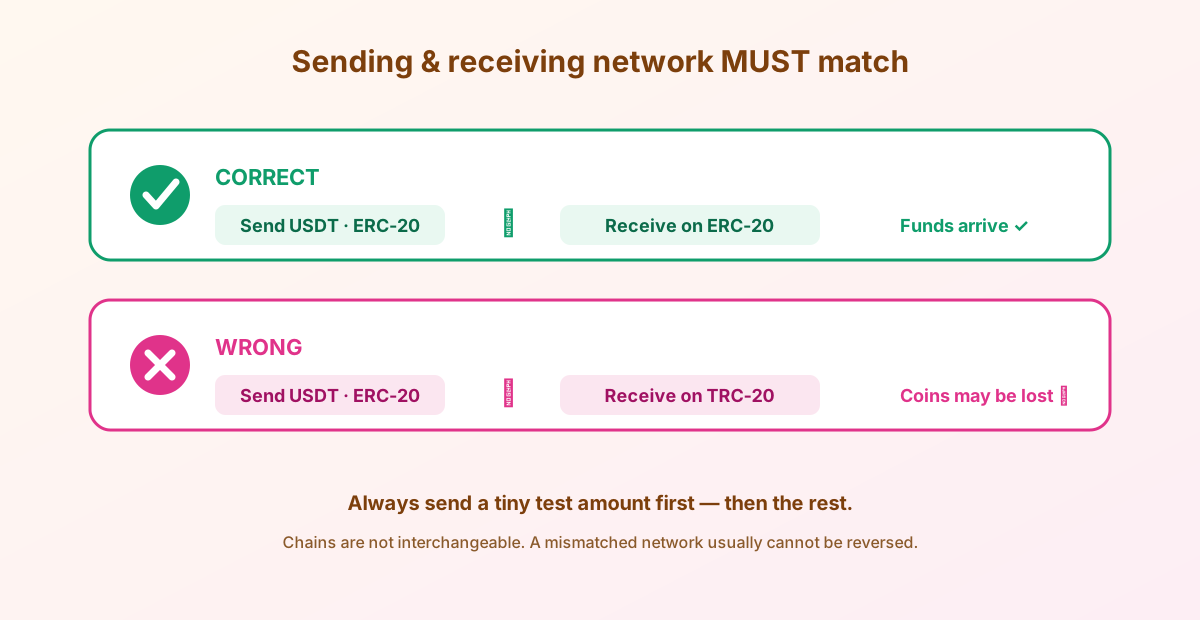
The classic disaster: withdrawing USDT on the ERC-20 network to an address that only accepts TRC-20 (or vice versa). The address formats can look interchangeable, but the chains are not. Follow this every single time:
- Confirm the exact network on both sides before sending — ERC-20, TRC-20, BEP-20, Solana, etc.
- Copy-paste the address; never type it. Then verify the first and last characters.
- Beware clipboard-hijacking malware that swaps addresses — check every character.
- Send a small test amount, wait for it to arrive, then send the rest.
⚠ Mismatched-network transfers are usually irreversible. No support ticket brings them back. Thirty seconds of checking beats a permanent loss. When the amounts get large, this is also the point where a hardware wallet — reviewed on our wallet page — becomes the sensible next step.
Living with the app: alerts, tracking and privacy
Once you are set up, the app becomes a daily-carry tool, and a few features are worth turning on deliberately rather than discovering by accident. Price alerts are the most useful: set a target for the coins you care about and let the app notify you, instead of refreshing charts and letting emotion drive your timing. It is a small feature that quietly makes you a calmer participant.
Portfolio tracking gives you one screen for your balances and their movement — handy, but remember it reflects only what is on Zonda, not coins you hold in self-custody. If you spread funds across an exchange and a hardware wallet (as you should for larger amounts), your true net worth lives in more than one place; do not mistake the app's number for the whole picture.
A word on privacy and device hygiene, because a trading app is a high-value target on your phone:
- Lock your phone with a strong passcode and biometrics — it is the first wall around the app.
- Enable the app's own biometric lock if offered, so an unlocked phone still cannot open your account.
- Keep the OS and the app updated; security fixes ship in updates.
- Be wary of screen-sharing, remote-access "support" apps, and anyone asking you to install something during a call — that is a common scam vector.
- Turn off lock-screen previews for the app's notifications so codes and balances are not visible to a shoulder-surfer.
None of this is Zonda-specific — it is basic mobile security — but a crypto app is exactly the kind of thing that punishes sloppiness. Treat the phone that holds your exchange app the way you would treat a wallet full of cash, because functionally that is what it is.
The app, honestly: pros and cons
What works well
- One app for buying, selling, real order-book trading, staking and Earn.
- Clean 2.0 redesign; reasonable for beginners and daily use.
- Strong account security: 2FA, passkeys, QR desktop login.
- Live prices and portfolio tracking in your pocket.
What to keep in mind
- Custodial — the app is not a self-custody wallet.
- Instant buy is pricier than placing a limit order.
- No official standalone desktop app (browser only).
- Feature and coin availability vary by country.
- Mobile-only signing means you should still cold-store big savings.
Net: a capable, secure mobile front end to a regulated exchange — excellent for the on-ramp and active use, not a replacement for self-custody. Download it from the right place, lock it down, test your first withdrawal, and it will serve you well.
Frequently asked questions
Is there an official Zonda Crypto app?
Yes — the zondacrypto 2.0 app for iOS (App Store) and Android (Google Play). Install only from those official stores or a link on zondacrypto.com. Verify the developer name to avoid clones.
Is it safe to download a Zonda APK?
Only if it comes from the official Google Play listing or an official zondacrypto.com link. APK files from random websites, ads or chat groups are a leading cause of drained accounts. If Google Play offers the app in your country, use it and skip third-party APKs entirely.
Is there a Zonda desktop app for Windows or Mac?
There is no widely distributed official desktop installer; the desktop experience is the web trading platform in your browser. Be very cautious of any "Zonda desktop download" executable, and log in through the official site instead.
What phone do I need to run the app?
A current iPhone/iPad or Android phone from the official stores. Keep your OS updated for security. Exact minimum versions are listed on the store pages — check them there.
Why does the app need KYC?
Zonda is a regulated EU exchange, so identity verification is mandatory before you can trade or withdraw. Have a government ID ready; timing varies with demand.
Can I hold my crypto long-term in the app?
You can, but the app is a custodial exchange front end — the keys are held by the platform. For long-term savings, withdraw to a self-custody wallet you control. See our wallet page for how.